How HomeHerald Logs Every HOA Transaction (Property Ledgers + Trust Accounting)
How HomeHerald Logs Every HOA Transaction (and Why Residents Stop Asking “Did My Payment Get Received?”)
The single most-repeated question in a self-managed HOA is some version of:
“Did my payment go through?”
The runner-up is the treasurer’s version of the same question:
“Did I record that payment yet?”
Both questions exist for the same reason. In a typical self-managed HOA, payments live in three or four disconnected places. A PayPal inbox over here. A Venmo notification on someone’s phone. A check sitting on the treasurer’s kitchen counter. A Stripe payout that hit the bank last Tuesday. Nobody has the whole picture, and nobody is sure the picture matches the bank.
HomeHerald replaces all of that with a single transaction log that every board member sees in real time, and a per-property ledger that every resident sees from their own phone. This post walks through how it works and why “did my payment get received?” stops being a question.
The two ledgers behind every HOA
HomeHerald keeps two views of the same set of transactions.
The property ledger. Every property in the community has its own running balance, the same way a credit card statement has a running balance. Charges go on (dues, fines, assessments, amenity rentals, transfer fees). Payments come off. The balance at the top is what the property currently owes the HOA.
The resident at that property sees this ledger inside the HomeHerald app and on the web. Every charge, every payment, every fee, in chronological order, with dates, amounts, and a short description. If the balance is zero, the resident knows it. If they are $50 in arrears, they know that too, and they can see exactly why.
The HOA’s trust accounting ledger. Same transactions, different lens. The HOA’s ledger views the world as debits and credits across the trust account. A dues payment shows as money in. A landscaping invoice shows as money out. The ledger drives the Profit and Loss report, the AR Aging report, and the bank reconciliation.
A self-managed HOA holds money in trust for its members. The trust ledger is how that responsibility gets documented. Every dollar collected from a resident lands in the HOA’s trust account and is tracked separately from any other entity’s money. Every expense paid out is attributed to one of the standard categories (Landscaping, Insurance, Legal, Utilities, Reserve Contributions, and so on).
Both ledgers are views of the same underlying transactions. When a resident pays $250 of dues, the property ledger shows a $250 payment, the property’s balance drops by $250, and the HOA’s trust ledger shows a $250 credit to dues revenue. One event. Two perspectives. Always in sync.
What the resident sees
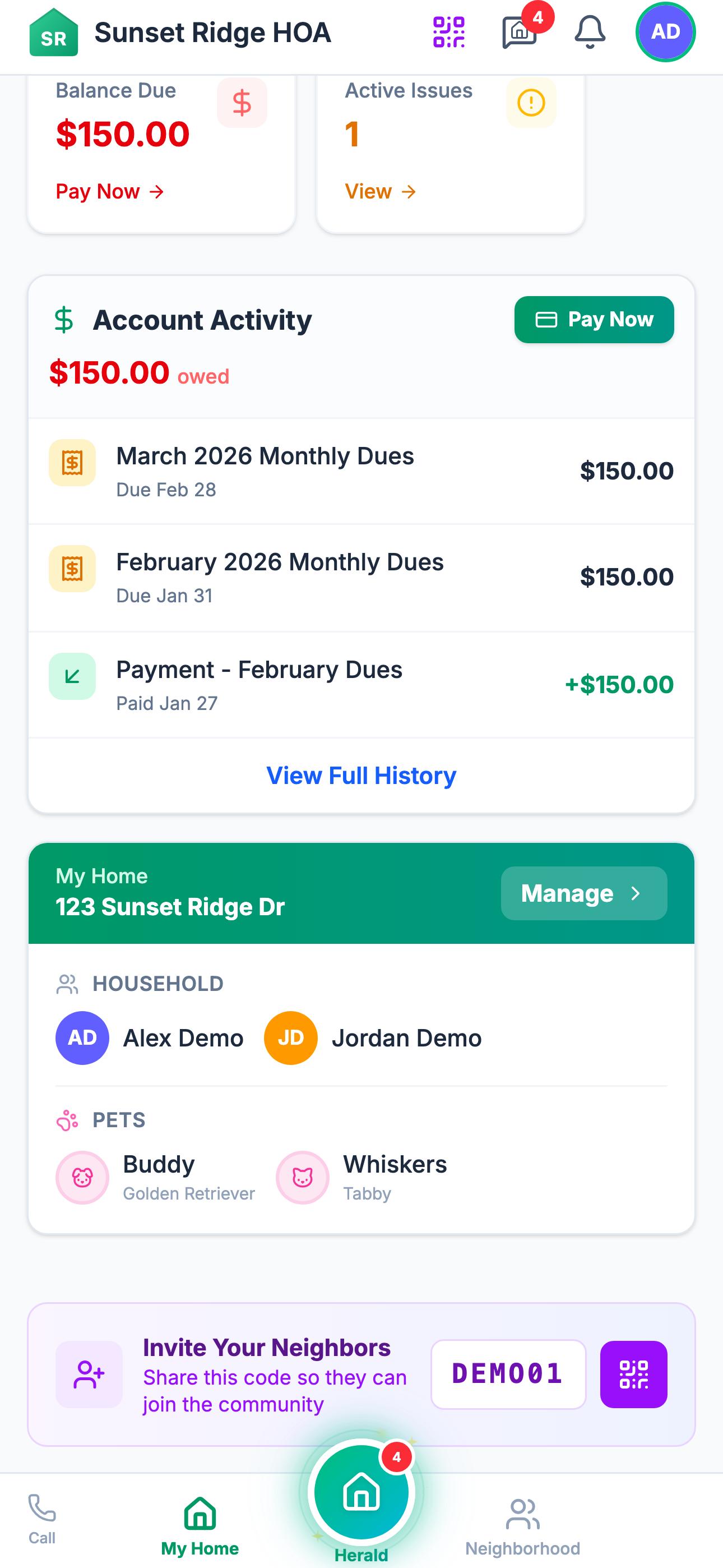
A resident in HomeHerald sees their own property’s ledger and nothing else. From the home screen they tap My Account (or Account on web) and the first thing they see is the current balance and a Pay button.
Below the balance is the transaction list:
- Apr 1, 2026 - Q2 dues assessment - $250.00 charge
- Apr 4, 2026 - Payment received (Stripe ACH) - $250.00 payment
- May 1, 2026 - Q3 dues assessment - $250.00 charge
- May 8, 2026 - Payment received (Venmo) - $250.00 payment
Every charge. Every payment. Method noted. Running balance updated.
If a resident sent a Venmo payment this morning and the board has not matched it yet, the resident sees the charge but not the credit, and the Pay button still says “$250 due.” Within an hour or two of the Venmo notification arriving in the HOA’s connected inbox, the payment is matched and the balance updates. The resident sees the credit appear without having to ask anyone.
This single feature kills more inbound email to the board than any other part of HomeHerald.
How the resident pays
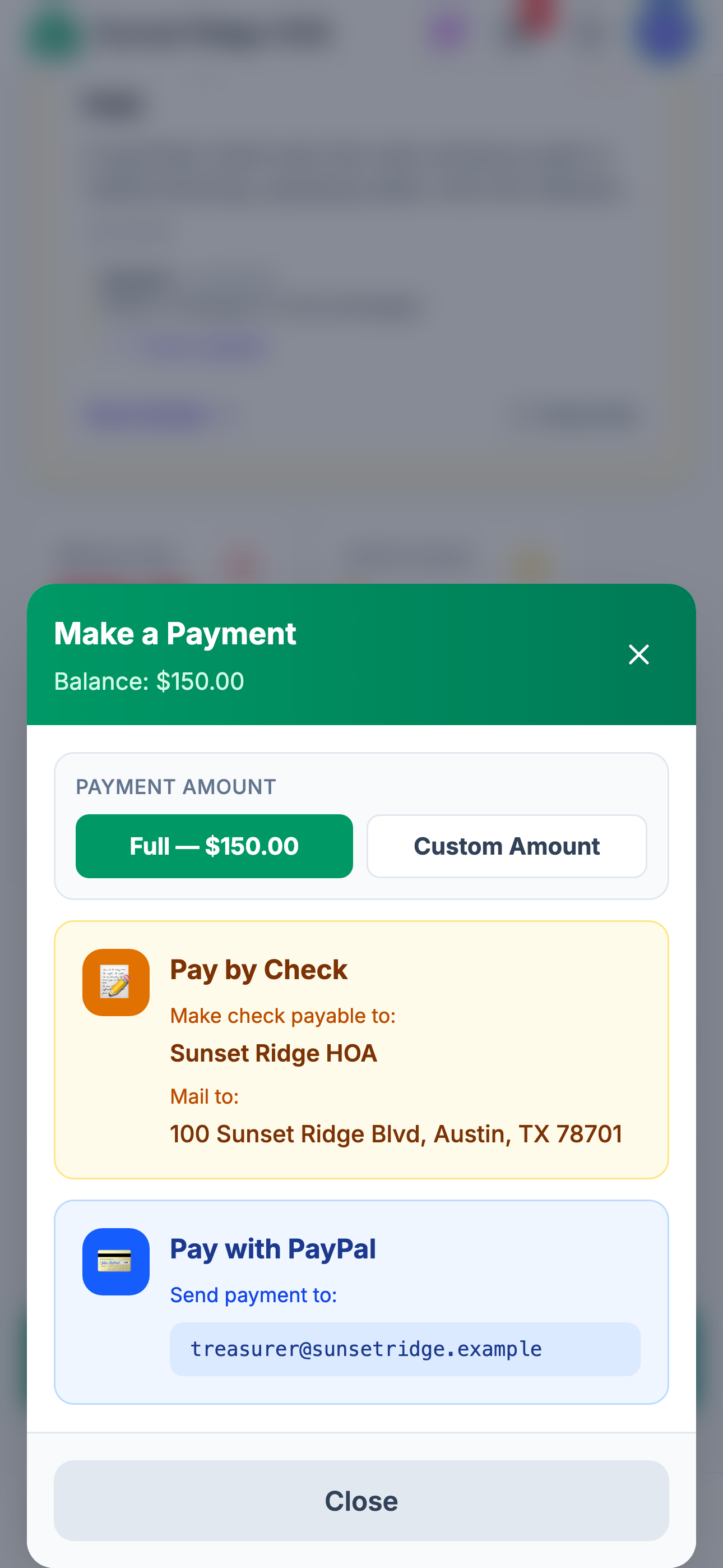
Payment options inside the HomeHerald app are whatever the board has enabled. The board picks the menu. The resident picks from the menu.
The full set of options available to a board:
Stripe rails (instant, automatic match).
- Credit card and debit card
- ACH bank transfer
- Apple Pay
These post directly to the property ledger the moment Stripe confirms the payment. No human involvement. The resident sees the credit immediately. A small convenience fee applies (the board can choose to absorb this or pass it to the resident).
Peer-to-peer rails (automatic match via email scanning).
- PayPal
- Venmo
- Cash App
- Zelle
The board connects an HOA email address (the same one the community uses for general correspondence). When a resident pays through any of these services, the notification email arrives in that inbox. HomeHerald’s AI parses the email, extracts the amount, the payer, and any fees, then matches the payment to a property and posts it to the ledger. Match accuracy on PayPal and Venmo is near perfect because those services include the payer name and a memo line. Cash App and Zelle are close behind.
The board does not read these emails. They land, get parsed, and the transaction appears.
Manual rails (tracked, not automatic).
- Check
- Cash
- Bank transfer (resident-initiated, outside Stripe)
For these, the resident sees instructions in the app on where to mail the check or how to initiate the transfer. When the treasurer logs the payment, the property ledger updates and the resident sees the credit.
The board picks which of these to expose. A small HOA might only enable Stripe ACH and check. A larger one might enable everything. The resident never sees an option that the board has not approved.
What the board sees
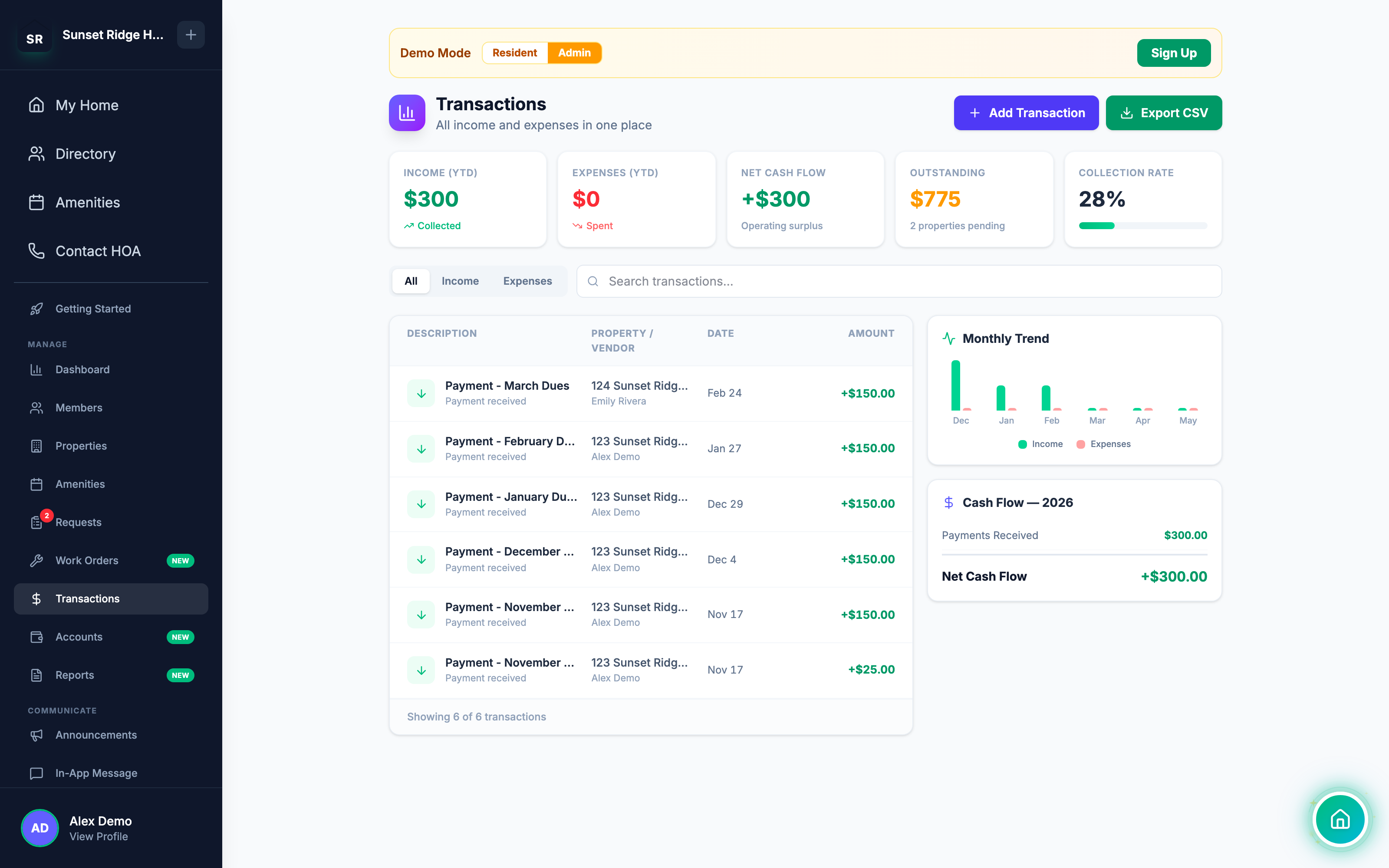
The board sees the same transactions the resident does, but across every property and with full editing rights.
In the admin panel, Manage > Transactions is the master transaction log. Every dollar in and every dollar out, across the whole community, in one chronological list. Filters at the top:
- Date range
- Type (charge, payment, expense, adjustment)
- Property
- Category
- Method (Stripe, PayPal, Venmo, Cash App, check, ACH, cash)
- Status (pending, posted, voided)
A board member trying to figure out whether last week’s pool deposit was recorded clicks the date range, picks the week, types “amenity” in the filter, and sees the deposit, the payer, the method, and the timestamp. Total elapsed time: about 8 seconds.
Every board member sees this. The treasurer, the president, the secretary, anyone with admin access. There is no version of HomeHerald where one board member has visibility and the others do not. Transparency is structural.
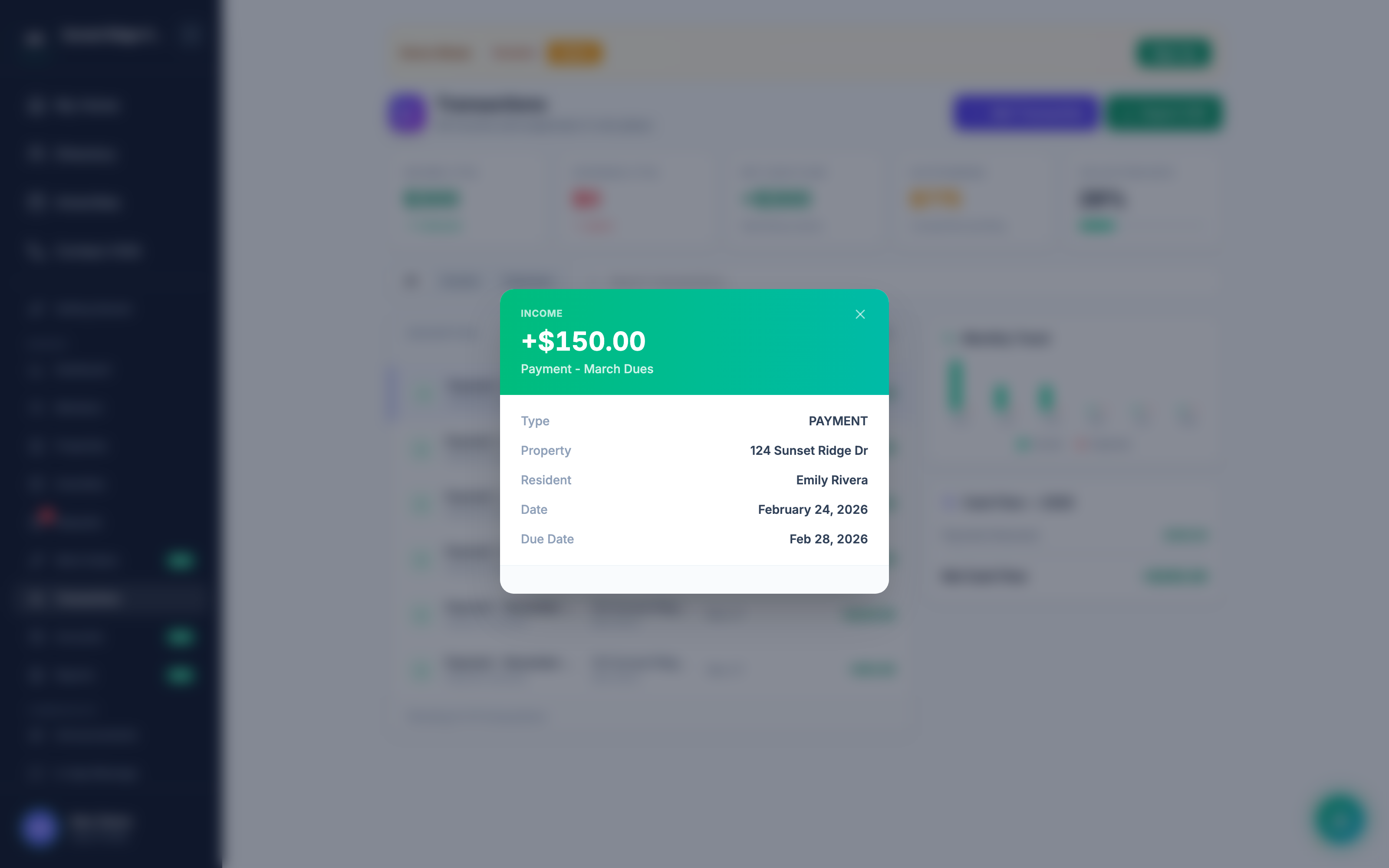
The board can also drill into a single property from the Properties tab. The property page shows the same ledger the resident sees, plus three things the resident does not see:
- The internal status of pending payments (received but not yet cleared)
- Notes the board has added to specific transactions
- The full edit history of any transaction (who changed what, when)
That last one matters. If a payment was posted on March 4 and recategorized on March 11, both events are stamped with the user who did it and the timestamp. There is no “I do not know who changed this” in HomeHerald.
The audit trail
Every transaction in HomeHerald carries an audit trail. The trail captures:
- Who created the record and when
- Every edit since creation: which fields changed, what the old and new values were, who did it, when
- Whether the transaction has been reconciled (and which reconciliation period it belongs to)
- Whether the transaction was voided (and why)
- Any attachments (receipt photos, check images, payment confirmation screenshots)
The audit trail is automatic. The treasurer does not have to remember to log it. The system logs it.
This is what protects the volunteer treasurer when, two years later, a resident or a future board asks why a particular charge was reversed in May 2026. The answer is not “I do not remember.” The answer is the audit trail.
How charges land on the property ledger
Payments are only half the story. The other half is charges. HomeHerald posts charges to property ledgers from five sources:
Recurring dues (via Dues Chaser). Configure Dues Chaser once, and the assessment posts to every property on schedule (monthly or annually with split-payment support). The same automation sends the dues notice on cycle day, by email or printed USPS letter, depending on what the board has enabled for each property. If a property goes past due, Dues Chaser also runs the full collection ladder: in-app reminder, then email, then SMS, then physical letter, with late fees applied automatically after the grace period. The resident sees the new charge and the new balance the same day it posts.
Special assessments. A one-time charge to every property for a reserve project, an insurance shortfall, or a capital improvement. Posted by the board with a description and a due date, and because assessments can be billed by unit or to a single property, the line item lands only on the ledgers it should. Visible to the resident immediately.
Fines. When Herald Shield (or the board manually) applies a fine for a covenant violation, the fine posts to the property’s ledger as a charge. The resident sees it. The reason is in the description.
Amenity bookings. When a resident books the clubhouse or the pool, the rental fee and any refundable deposit post to the ledger. Stripe holds the deposit until the booking completes, then releases it automatically (typically within 5 to 7 days).
Transfer and estoppel fees. When a property sells and the closing agent requests a Herald Welcome packet, the transfer fee posts to the buyer’s ledger. The seller’s final dues proration shows up too.
Five charge sources. One ledger. One running balance per property. The resident always knows what is owed and why.
The end of “did my payment get received?”
Add up what changes when the property ledger and the HOA’s trust ledger are the same set of records, visible to everyone with the right role, updated automatically as Stripe posts and as P2P emails get parsed:
- The resident never has to ask whether a payment went through. They open the app and see.
- The treasurer never has to confirm a payment received over the weekend. The system confirms it.
- The other board members never have to ask the treasurer for a financial summary. They open the same view.
- The year-end audit is not a reconstruction exercise. It is an export.
A self-managed HOA runs on trust. The fastest way to lose that trust is for residents to suspect their money is not being tracked. The fastest way to keep it is to make the tracking visible.
HomeHerald’s transaction log is not a feature buried in a settings menu. It is the primary surface every resident and every board member touches. When the ledger is the product, “did my payment get received?” stops being a question.
How to set it up
For boards new to HomeHerald, the financial side comes online in three steps:
- Connect a bank account through Stripe. Admin Panel > Manage > Settings > Payments > Connect with Stripe. Stripe’s hosted onboarding (Express) walks the board through verifying the HOA’s identity and linking the trust account that payouts deposit into. Once Stripe confirms, the cash account appears in HomeHerald with a live balance.
- Enable the payment methods you want. Admin Panel > Manage > Settings > Payment Methods. Toggle Stripe, PayPal, Venmo, Cash App, Zelle, check, ACH, cash. For each P2P method, enter the receiving account (your PayPal email, Venmo handle, and so on) so HomeHerald can match incoming notifications.
- Connect the community inbox for P2P email scanning. Admin Panel > Manage > Settings > Inbox. Walk through the OAuth flow for Gmail or another provider. From that point on, P2P payment emails are parsed and matched automatically.
The property ledgers, the transaction log, and the resident view come online the moment the first transaction posts. There is no separate “turn on transparency” switch.
Cash account setup, live balances, the full reconciliation flow, P&L reports, AR Aging reports, and the complete financial management suite are on every HomeHerald plan, starting at $49/month. The first 14 days are free with no credit card, and adding a card any time after that starts a full 30-day free trial - nothing is charged until that trial ends.
Try HomeHerald. Your residents will stop asking. Your board will stop wondering. The books will match the bank.
Ready to simplify HOA management?
Every community can try HomeHerald free - no card needed. Add a card any time for a full 30-day free trial.
Try for Free